





Активация VPN
Активация ключа с Регионом Россия для других регионов с помощью VPN сервисаЗаходим на сайт Speedify выбираете Скачать для вашей операционной системы. (Visit site Speedify, and download for your operation system) Скачиваем и устанавливаем VPN приложение.
(Download and install the VPN application.) Для того, чтобы включить доступ – пролистываем всю информационную панель в приложении до последнего слайда и нажимаем Ограниченная версия
(In order to enable access - flick through the information panel in the app until the last slide and click the Limited version) Далее, переключаем программу в режим работы (Свитчер право), выбираем страну – Россия в настойках.
(Next, we switch the program to work mode (Switcher right), choose a country – Russia in settings.) После этого ваш IP будет изменён на Российский, вы можете перезапустить приложения для активации и активировать ключ.
(After that, your IP will be changed to Russian, you can restart the applications to activate and activate the key.) Запускаем приложение Steam и входим под своими данными.
(We launch the Steam application and enter under our data.) Необходимо нажать на свой логин в верхней правой части клиента Steam и выбрать пункт "Об аккаунте". Меняем свою страну магазина на Россию. (You must click on your username in the upper right part of the Steam client and select "About Account". We are changing our store country to Russia.) Если не получается изменить страну и просит зайти в Steam из нужной страны - необходимо изменить пароль в Steam и войти снова через VPN. (If you can’t change the country and asks to enter Steam from the desired country, you need to change the password on Steam and log in again via VPN.) После смены страны активируем в Steam полученный ключ. (After changing the country, we activate the received key on Steam.) Заходим в Microsoft Store
(We go to the Microsoft Store) В поиске находим Avira Phantom VPN
(We find Avira Phantom VPN in the search) Скачиваем и запускаем программу
(Download and launch the program) Настраиваем Местоположение: Россия
(Setting Up Location: Russia) После этого ваш IP будет изменён на Российский, вы можете перезапустить приложения для активации и активировать ключ.
(After that, your IP will be changed to Russian, you can restart the applications to activate and activate the key.)
Пожалуйста, перед покупкой ключа, для которого необходима активация с помощью VPN, прочитайте данную инструкцию. Если Вы не уверены в том, что Вы можете активировать ключ с помощью данного способа – воздержитесь от покупки ключа с заблокированным регионом.
Данный пример приводится на основе программы Speedify, но из-за особенностей устройства или региона, в котором вы находитесь, данная программа может не работать. В таком случае, пожалуйста, воспользуйтесь другой программой для смены IP.
(Download and install the VPN application.)
(In order to enable access - flick through the information panel in the app until the last slide and click the Limited version)
(Next, we switch the program to work mode (Switcher right), choose a country – Russia in settings.)
Вот так выглядит включенное и рабочее приложение:
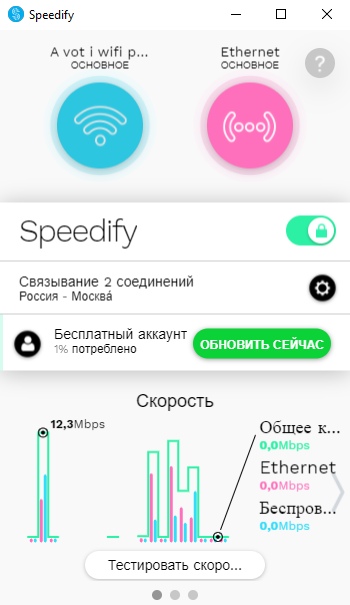
(After that, your IP will be changed to Russian, you can restart the applications to activate and activate the key.)
Есть некоторые приложения и версии Windows, с которыми требуются дополнительные действия для активации Ключа, описание для них находится ниже:
(There are some Windows apps and versions that require additional steps to activate the Key, additional instructions for them are given below:)
Steam:
(We launch the Steam application and enter under our data.)
Ограниченная версия Windows
Limited version of Windows
Для ограниченной версии Windows, с возможностью установки приложений только из Microsoft store
(For a limited version of Windows, with the ability to install applications only from the Microsoft store):
(We go to the Microsoft Store)
(We find Avira Phantom VPN in the search)
(Download and launch the program)
(Setting Up Location: Russia)
(After that, your IP will be changed to Russian, you can restart the applications to activate and activate the key.)